


How to find your Kick Stream URL and Stream Key (RTMP/RTMPS) to go live with OBS
To stream live on Kick using an encoder (e.g., OBS Studio, Streamlabs Desktop, vMix), you need two values from the Creator Dashboard: the Stream URL (RTMP/RTMPS server) and your Stream Key. This guide shows where to find them and how to paste them into your encoder.
Your Stream Key is like a password. Don’t share it or show it in public screenshots. If you think it was exposed, use Reset to generate a new key.
1) Requirements & what you need
- A Kick account with access to the Creator Dashboard.
- An encoder (e.g., OBS Studio).
- Stable upload bandwidth (Ethernet recommended).
Stream URL (Server):  rtmp(s)://HOST[:PORT]/PATH
Stream Key:           LONG_KEY_GENERATED_BY_KICK
In OBS: Server = Stream URL • Stream Key = Stream Key.
2) Open the Creator Dashboard
- Log in at kick.com.
- Click your profile icon (top-right).
- Select Creator Dashboard.
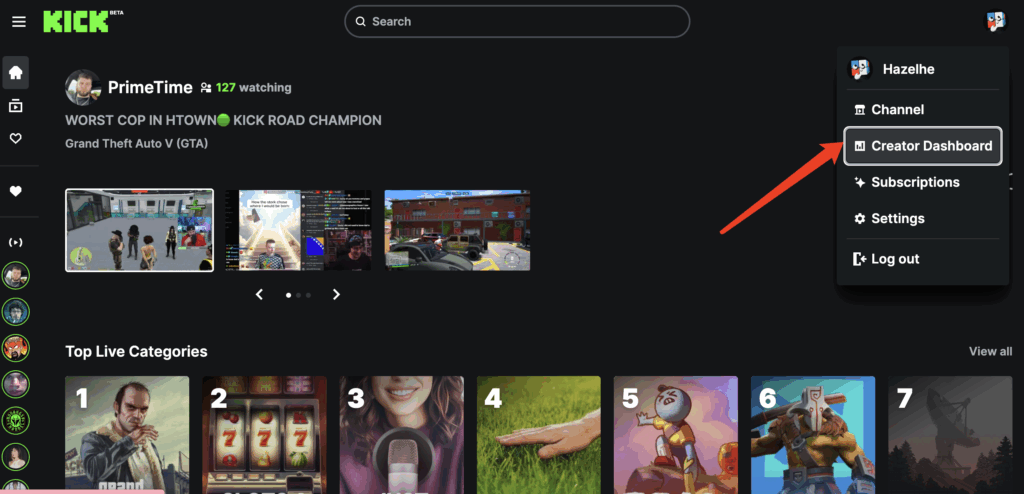
3) Find “Stream URL & Key”
- In the left sidebar of the Creator Dashboard, open Channel.
- Click Stream URL & Key.
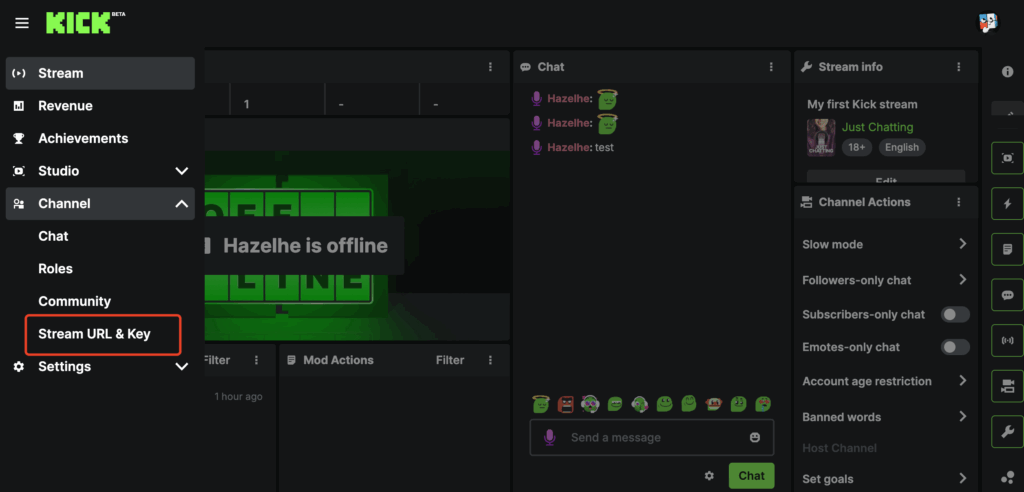
4) Copy Stream URL and Stream Key
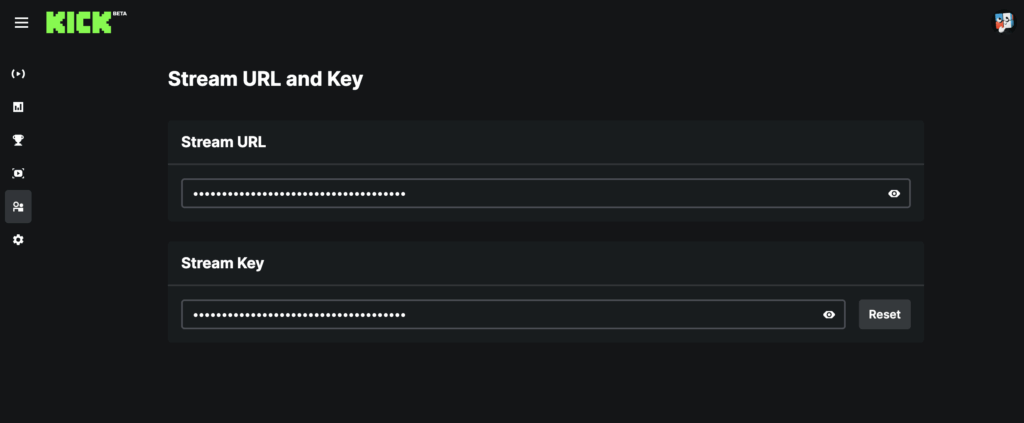
On this page you’ll see both Stream URL and Stream Key with copy controls. Copy both and store them securely (not in shared chats/documents).
- Click Copy (or the copy icon) next to Stream URL.
- Click Copy next to Stream Key.
- If needed, click Reset to generate a new key.
Some RTMP tools/services require the Stream URL to include the
/app path (e.g., rtmps://...:443/app). If the connection fails, try adding /app at the end of the Stream URL, or use the full RTMPS URL suggested in Kick-related instructions.:443/app in a Custom RTMP workflow. Image source: StreamYard Help (Kick via Custom RTMP).5) Enter Stream URL/Key in OBS (Custom)
- Open OBS ? Settings ? Stream.
- Set Service to Custom… (or “Custom Streaming Server”).
- Paste Kick’s Stream URL into the Server field.
- Paste the Stream Key into the Stream Key field.
- Save with Apply / OK.

After pasting, double-check there are no leading/trailing spaces in the URL or key — it’s a very common cause of connection errors.
6) Start your live stream
- In OBS, click Start Streaming.
- Return to Kick: your channel typically switches to “live” once ingest is active.
- To end: click Stop Streaming in OBS.
7) Recommended settings
Safe baseline RTMP/RTMPS settings (adjust to your upload). If your network is unstable, prefer 720p and a lower bitrate.
| Parameter | Recommendation | Notes |
|---|---|---|
| Video codec | H.264 | Maximum compatibility. |
| Resolution | 1080p or 720p | If you see dropped frames, switch to 720p. |
| FPS | 30 (or 60 if your PC/upload can handle it) | 30 fps is more stable; 60 fps needs more bitrate. |
| Video bitrate | 3.5–8 Mbps (based on upload) | Don’t saturate your upload (see note below). |
| Keyframe interval / GOP | 2 seconds | Common ingest requirement. |
| Audio | AAC 128–192 kbps @ 48 kHz | 160 kbps is a good balance. |
| Rate control | CBR when possible | Helps ingest stability. |
Keep total bitrate (video+audio) within about 60–70% of your real measured upload (speed test) to avoid saturation and dropped frames.
8) Troubleshooting
Connection error / “failed to connect”
- Copy Stream URL and Stream Key again from the Creator Dashboard (no spaces).
- If using RTMPS, try a full URL with
:443and/or/app(see the technical note above). - If you suspect compromise, click Reset and update OBS with the new key.
- Check firewall/VPN/proxy settings — they can block RTMP connections.
Choppy stream / buffering
- Lower bitrate or resolution (720p).
- Use CBR and 2s keyframes.
- Stop other uploads (cloud backups, calls, etc.).
9) FAQ
Can I share the Stream Key with a collaborator?
Not recommended. If you must, treat it like a password and reset it right after the live ends.
How often does the Stream Key change?
It typically stays valid until you click Reset. If you reset it, update your encoder immediately.
RTMP or RTMPS: which one should I use?
If available, RTMPS (URL starting with rtmps://) is encrypted and preferred. Use whatever Kick provides and what your encoder supports.
References: Kick Help — How to Stream on Kick • YoloLiv — How to Find the Kick Stream Key & URL • StreamYard — Kick via Custom RTMP